1. Space
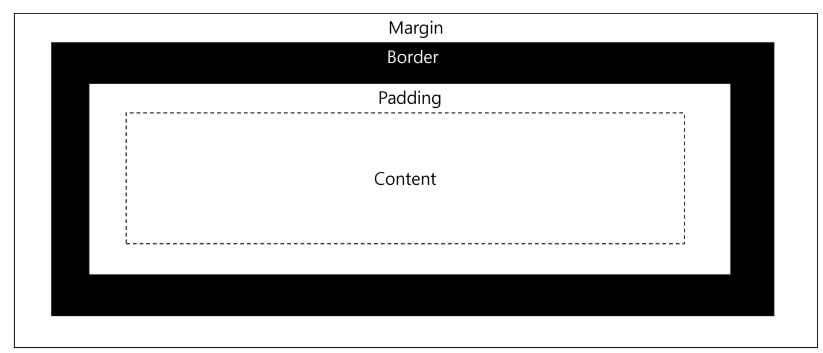
<html>
    <head>
        <meta charset="UTF-8">
        <title>CSS</title>
        <link rel="icon" href="../img/chrome.png">
        <style>
            table, th, td{
                border: 1px solid black;
                border-collapse: collapse;
            }

            th, td{
                /* padding: 5px; */
                /* padding: 5px 10px; */
                padding: 5px 10px 5px 10px;
            }

            table{
                margin: 10px;
            }

        </style>
    </head>
    <body>
        <table>
            <thead>
                <tr>
                    <th>이름</th>
                    <th>나이</th>
                </tr>
            </thead>
            <tbody>
                <tr>
                    <td class="name">홍길동</td>
                    <td class="age">70</td>
                </tr>
                <tr>
                    <td class="name">이순신</td>
                    <td class="age">100</td>
                </tr>
                <tr>
                    <td class="name">김길동</td>
                    <td class="age">38</td>
                </tr>
            </tbody>
        </table>
    </body>
</html>
2. Background - color
| background-color | 특정 색상을 지정한 태그의 배경에 채운다. |
| background-image | 특정 이미지를 지정한 태그의 배경에 채운다. |
<html>
    <head>
        <meta charset="UTF-8">
        <title>CSS</title>
        <link rel="icon" href="../img/chrome.png">
        <style>
            body{
                background-color: lightblue;
            }

            h1{
                background-color: #01DFD7;
            }

            P{
                background-color: rgb(93, 70, 70);
            }
        </style>
    </head>
    <body>
        <h1>welcome to css page!!</h1>
        <p>css background image</p>
        <div>
            <a href="http://html-color-codes.info" target="_blank">color picker</a>
        </div>
    </body>
</html>
3. Background - image
| background-repeat | 이미지를 반복한다. |
| background-position | 이미지의 위치를 지정한다. |
| background-size | 이미지의 크기를 지정한다. |
<html>
    <head>
        <meta charset="UTF-8">
        <title>CSS</title>
        <link rel="icon" href="../img/chrome.png">
        <style>
            img{
                width: 100px;
            }
            .image{
                width: 100px;
                height: 100px;
                background-image: url("../img/chrome.png");
                background-size: 100px 100px;
            }
        </style>
    </head>
    <body>
        <img src="../img/chrome.png"/>image
        <div class="image">chrome icon</div>
    </body>
</html>
<html>
    <head>
        <meta charset="UTF-8">
        <title>CSS</title>
        <link rel="icon" href="../img/chrome.png">
        <style>
            body{
                /* 백그라운드 이미지는 자동으로 이미지보다 요소가 크면 반복된다. */
                background-image: url("../img/img03.jpg");
                /* background-repeat: repeat-x; x방향으로만 반복 */
                /* background-repeat: repeat-y; y방향으로만 반복 */
                background-repeat: no-repeat;
                /* background-position: right bottom; top right bottom left */
                background-position: 50% 50%;
            }
        </style>
    </head>
    <body>

    </body>
</html>
<html>
    <head>
        <meta charset="UTF-8">
        <title>CSS</title>
        <link rel="icon" href="../img/chrome.png">
        <style>
            body{
                /* 요소보다 큰 이미지가 오면 자동으로 잘라낸다. */
                background-image: url("../img/lovlies.png");
                /* background-size 로 이미지 크기 지정이 가능하다. */
                /* contain  */
                background-size: contain;
                background-repeat: no-repeat;
                background-position: 50% 50%;
            }
        </style>
    </head>
    <body>

    </body>
</html>
4. Display
| none | 해당 요소를 보이지 않게 한다. |
| block | 해당 요소를 block 속성으로 보이게 한다. |
| inline | 해당 요소를 inline 속성으로 보이게 한다. |

<html>
    <head>
        <meta charset="UTF-8">
        <title>CSS</title>
        <link rel="icon" href="../img/chrome.png">
        <style>
            input[type="text"] {
                display: block; /* none|inline|block */
            }
            div {
                width: 50px;
                height: 25px;
                border: 3px solid yellowgreen;
                margin: 10px;
                /* float : 특정한 방향으로 정렬이 흘러가도록 하는 속성 */
                float: left;
            }
            div.first {
                border-color: red;
                /* float:left 속성을 지우고(벗어나고) 싶다. */
                clear: left;
            }
        </style>
    </head>
    <body>
        <!-- inline : 좌에서 우로 정렬 -->
        <input type="text"/>
        <input type="text"/>
        <input type="text"/>
        <input type="text"/>

        <!-- block : 위에서 아래로 정렬 -->
        <div></div>
        <div></div>
        <div></div>

        <div class="first"></div>
        <div></div>
        <div></div>

        <div class="first"></div>
        <div></div>
        <div></div>

    </body>
</html>
'CSS' 카테고리의 다른 글
| 03. Hover, Width, Position, Z_Index, Opacity, Sprite (0) | 2024.02.28 |
|---|---|
| 01. Tags, Emoji, Selector, Border (1) | 2024.02.28 |
